Quick answer: Yes — in 2026, shoppers can discover your Shopify products inside ChatGPT, then finish the purchase on your own store. For Shopify merchants this is on by default for eligible stores, there's no extra Shopify fee, and it runs through Shopify Catalog. You don't build an app or upload a feed. Your job is to (1) make sure your store is eligible and switched on, and (2) give ChatGPT clean product data so it actually recommends you. This guide shows both — in plain English.
"Agentic commerce" sounds like a buzzword, so let's keep it simple: it just means letting an AI assistant (like ChatGPT) help someone shop and buy. Below, what's real today, what changed in 2026, and exactly what to do.
Can people actually buy my Shopify products inside ChatGPT right now?
Short version: people can discover and compare your products inside ChatGPT today, and for Shopify stores the checkout finishes on your own storefront (ChatGPT opens your product/checkout page). They are not (for most stores) paying inside the chat.
This matters because a lot of older blog posts get it wrong. Here's the honest 2026 timeline:
- Late 2025: OpenAI launched "Instant Checkout" — buy without leaving ChatGPT — using the Agentic Commerce Protocol it built with Stripe. It charged merchants a fee.
- March 2026: OpenAI pulled back in-chat Instant Checkout. It wasn't converting well and was missing basics like sales tax, fraud checks, inventory sync, and multi-item carts. (CNBC)
- Now (mid-2026): For Shopify, the model is discover in ChatGPT → check out on your store. (Digital Commerce 360)
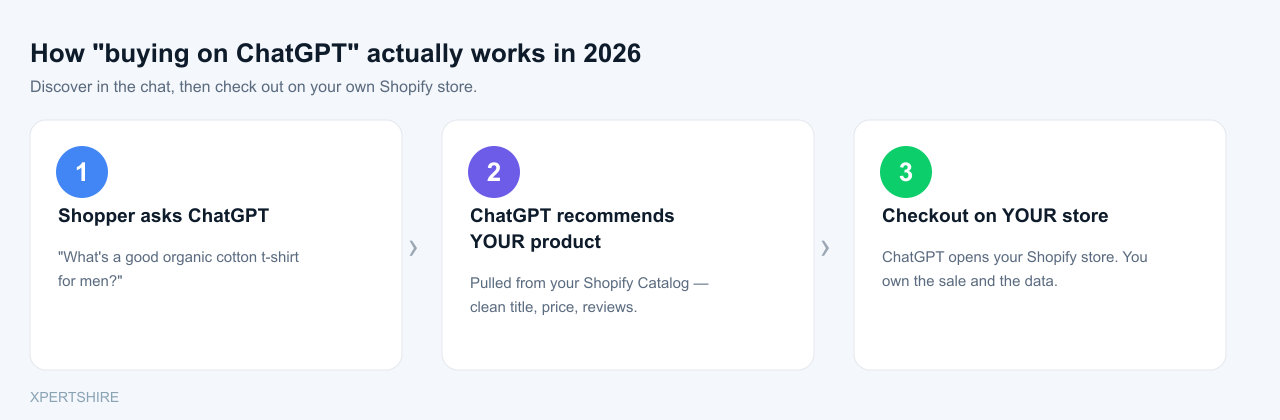
So don't chase the "buy inside the chat" headline. The real, working opportunity today is getting found and recommended in ChatGPT, then closing the sale on your own checkout — which you fully control.
What is "agentic commerce" — and what changed in 2026?
Two different "rails" power AI shopping, and people mix them up:
| Feature | The old in-chat model | The current Shopify model |
|---|---|---|
| Name | Agentic Commerce Protocol (ACP) | Universal Commerce Protocol (UCP) |
| Built by | OpenAI + Stripe | Shopify + Google (Shopify Engineering) |
| Where you pay | Inside ChatGPT | On your own Shopify store |
| Fee | ~4% OpenAI fee | No extra Shopify fee |
| Status | Scaled back (Mar 2026) | Live & default |
The takeaway: the future Shopify is betting on is open standards where the AI sends the shopper to your checkout, not a walled garden that owns the transaction. Shopify's Spring '26 Edition (June 17, 2026) made this the default and connected your catalog to ChatGPT, Microsoft Copilot, Google AI Mode, Gemini, and the Shop app at once. (Shopify Spring '26)
Is my Shopify store eligible — and is it already turned on?
For most stores, it's already on. Shopify switches on the ChatGPT agentic storefront automatically for eligible stores and syndicates your products through Shopify Catalog. (Shopify Help Center)
To be eligible, the Help Center says you need:
- Your store sells to US customers (your business can be based anywhere).
- Your products are eligible for Shopify Catalog (not B2B-only, not on OpenAI's prohibited list).
- You've agreed to the Agentic Storefronts Supplemental Terms.
- You have Terms of service, Privacy policy, and Return & refund policy filled in under Settings → Policies.
If any of those are missing — especially the store policies — you can quietly be left out. That's the most common reason a store isn't showing up.
How do I turn it on (or check it) in my Shopify admin?
A 2-minute check:
- Settings → Policies — make sure Terms of service, Privacy policy, and Return & refund policy are all filled in.
- Go to Sales channels → Agentic (Agentic Storefronts) in your admin.
- Confirm the ChatGPT channel is active. This is also where you'd opt out or turn off a specific AI channel if you ever want to.
- From the same Agentic Storefronts area you can see performance across ChatGPT, Copilot, Google AI Mode, Gemini, and Shop in one place.
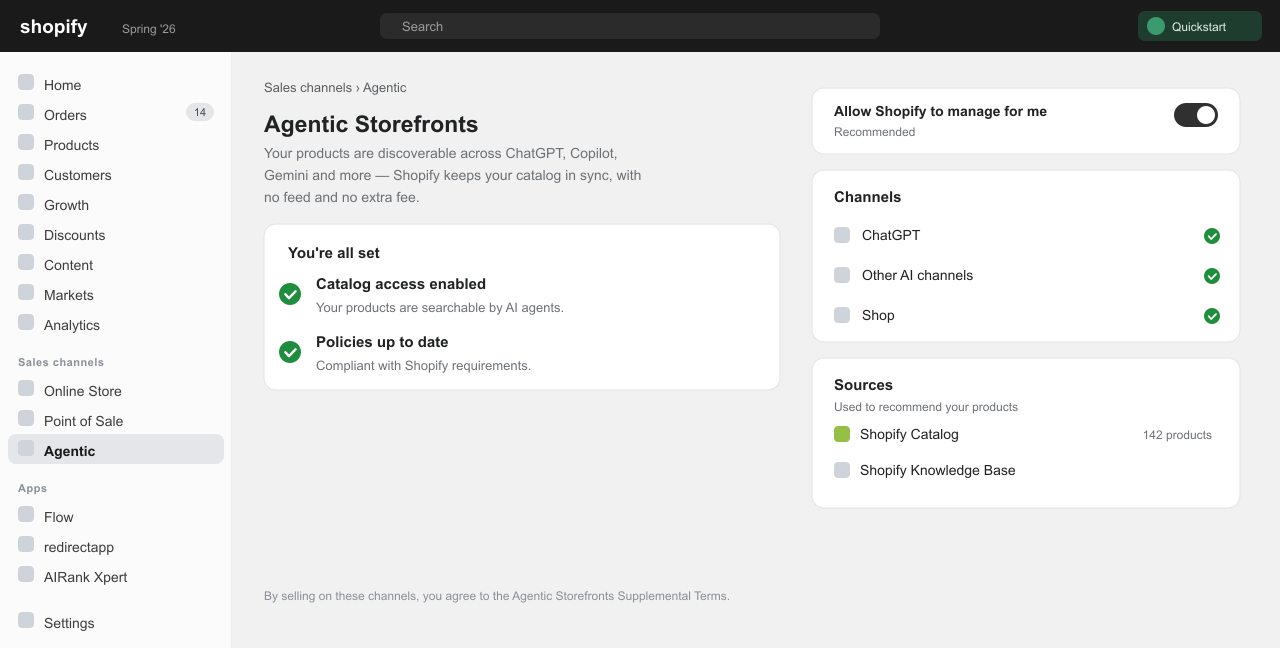
That's the whole "setup." There's no feed to upload and no app to install — Shopify Catalog reads straight from your product database, so your prices and stock stay accurate automatically. (For a deeper walkthrough of the Agentic Storefronts admin, see our Shopify Agentic Storefronts guide.)
Does Shopify or OpenAI charge a fee?
Shopify's ChatGPT agentic storefront has no extra fee — you pay your normal Shopify Payments processing rate, nothing more. (Shopify Help Center)
The 4% fee you may have read about was OpenAI's fee on the old in-chat Instant Checkout (PYMNTS) — the model that got scaled back. For the way Shopify stores sell through ChatGPT today, that fee does not apply.
How do I get ChatGPT to actually recommend my products?
This is the real game. Being eligible gets you in the pool. Being recommended is what gets you sales — and that comes down to how clearly an AI can understand your product. (This is the same skill set as AEO/GEO — answer/AI-search optimization.)
Do these, roughly in order of impact:
- Write AI-readable titles. Lead with what it is, the material, the use, and who it's for — not a clever brand-only name. "Organic cotton crewneck t-shirt — unisex, midweight" beats "The Sunday Tee."
- Write factual, plain descriptions with real numbers: size, weight, materials, fit, warranty, what's in the box. AI quotes specifics, not fluff.
- Fill in every product detail and variant — color, size, material. Use metafields for anything missing and Shopify's Catalog Mapping to connect custom fields.
- Add GTINs, real brand names, and correct product categories. These help the AI match your item to a shopper's request.
- Add Product, Offer and Review structured data (schema) and make sure it's server-rendered, not loaded only by JavaScript.
- Keep price and stock accurate. Wrong data was a top reason the in-chat experiment failed — Shopify says AI searches using its Catalog data convert at 2x the rate of scraped data. (Shopify)
- Let AI crawlers in. Don't block
OAI-SearchBotin yourrobots.txt. - Collect real reviews. AI assistants lean on recent, genuine review sentiment when they recommend.
A simple way to think about it: good SEO got you found by Google; good product data gets you recommended by AI.
How big is AI shopping really? (the honest numbers)
It's growing fast — but read the source on each stat, because "all AI retail" and "Shopify-only" numbers get mixed up:
- Shopify (Q1 2026 earnings): AI-driven traffic to Shopify stores grew about 8x year-over-year, and orders from AI-powered searches grew about 13x. (PYMNTS)
- Adobe Analytics (all US retail): AI-referred traffic was up 393% year-over-year in Q1 2026, and that AI traffic converted about 42% better than non-AI traffic. (via Yahoo Finance)
- Reality check: in one multi-country survey, only 17% of shoppers said they're comfortable letting AI complete a purchase for them. (Modern Retail)
So: AI is a real and fast-rising traffic source, most shoppers still want to finish on a store they trust — which is exactly the model Shopify now uses.
What mistakes should I avoid?
- Believing "buy inside ChatGPT" is the default. It was scaled back; today's flow sends shoppers to your store.
- Thin or messy product data. Missing attributes, no GTIN, copied descriptions, no review schema = you won't get recommended.
- Blocking AI crawlers or loading your product content/schema only with JavaScript.
- Skipping store policies. No TOS / Privacy / Refund policy = not eligible.
- Treating "buyable" and "recommended" as the same thing. Being listed isn't the same as being chosen — the product-data work above is what gets you chosen.
Do I have to set up ChatGPT, Gemini, Copilot and Google AI Mode separately?
No. Shopify Catalog syndicates your products to all of them, and you manage them from one place — Agentic Storefronts in your admin. Improve your product data once, and you improve your odds across every AI assistant at the same time.
Sources
- Shopify Help Center — ChatGPT agentic storefront
- Shopify Spring '26 Edition (merchant)
- Shopify Engineering — Universal Commerce Protocol
- CNBC — OpenAI revamps ChatGPT shopping after Instant Checkout
- Digital Commerce 360 — Shopify–ChatGPT integration changes
- PYMNTS — AI drove Shopify orders up 13x in Q1
Related reads:
- How to Make Your Shopify Products Show in ChatGPT (Agentic Storefronts setup)
- AEO / Answer Engine Optimization for Shopify
- Why Your Shopify Store Isn't Ranking on Google (2026)
Xpertshire builds AI-discovery-ready Shopify stores and product-data pipelines. We also publish AIRank Xpert — which optimizes the schema and clean product data that get your store recommended by ChatGPT, Gemini and Perplexity, and tracks your AI Share of Voice.