Quick answer: Black Friday is Friday 27 November 2026 and Cyber Monday is Monday 30 November. The quickest way to lift order value that weekend is an offer that rewards a second or third item — a quantity break ("buy 2, save 10%"), a bundle or a free gift — shown on the product page and applied automatically at checkout. Our app, Xperts Bundles Volume Discount, does all of these for free, and stores that install before our paid plans launch keep every feature free for as long as the app stays installed.
Black Friday falls on the same Friday in the UK, Canada, Australia and most other countries that run it, so the dates and steps below apply wherever your customers are.
We build this app, so read this as a vendor's guide. Every number below comes from Shopify's own published data, and every setup step comes from the app itself.
Why bigger baskets matter most over BFCM
Shoppers arrive ready to buy. You have already paid — in ads, emails and margin — to get them onto the product page, so the cheapest extra revenue is a second or third item in the same order.
Last year's numbers show how much is at stake (Shopify, 2 December 2025):
| BFCM 2025 on Shopify | Figure |
|---|---|
| Merchant sales over the weekend | $14.6 billion, up 27% on 2024 (24% at constant currency) |
| Shoppers who bought | 81+ million |
| Average cart | $114.70 |
| Peak sales | $5.1 million per minute, at 12:01 p.m. EST on Black Friday |
| Top-selling countries | US, UK, Australia, Germany, Canada |
| Cross-border orders | 16% of all orders |
That last line matters if you sell abroad: roughly one order in six crossed a border. If yours is one of those stores, our guide to why Shopify stores lose international traffic is worth ten minutes before Friday.
A volume tier, a bundle or a free gift gives a shopper a clear reason to add more — without cutting the headline price of any single item. More tactics in how to increase average order value on Shopify.
What Xperts Bundles Volume Discount does
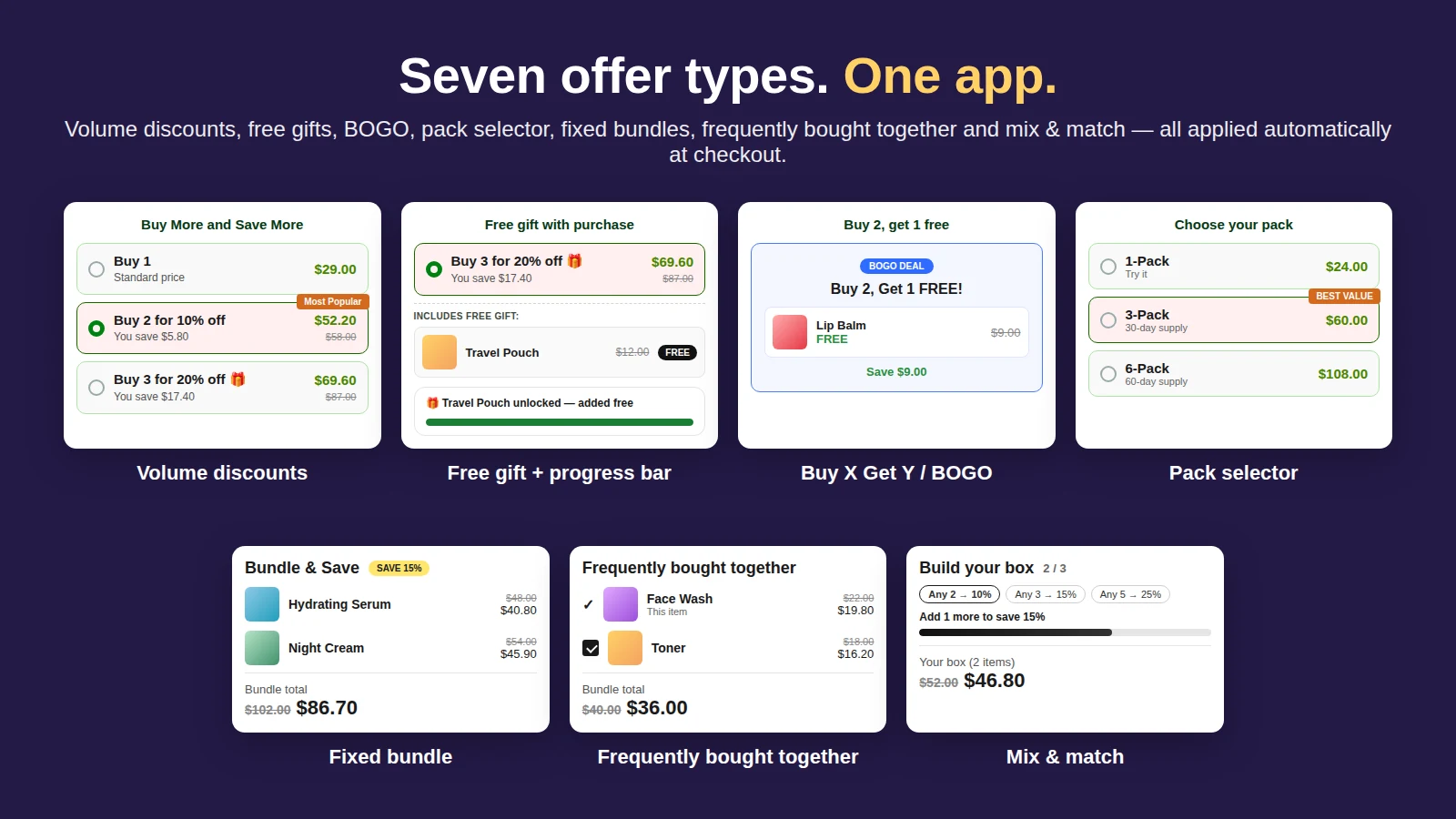
One app, seven offer types, all on your product pages. The discount applies automatically at checkout, so there is no code for the shopper to type.
| Offer type | What the shopper sees |
|---|---|
| Volume discount (quantity breaks) | Tiers like "Buy 2, save 10% · Buy 3, save 15%", on a product, a variant or a whole collection |
| Free gift with purchase | A gift added to the cart when a tier is reached, with an optional progress bar |
| Buy X Get Y / BOGO | "Buy one, get one free", or a discount on a second product |
| Pack selector | Your 1-pack, 3-pack and 6-pack variants as cards, each with its own price |
| Product bundle | 2 to 6 products sold together at one bundle price |
| Frequently bought together | A main product plus add-ons the shopper can untick |
| Mix & match | Shoppers pick items from a list or a collection — more items, bigger discount |
It works on every Shopify plan, from Basic to Plus, and runs on Shopify's Discount Functions. You can match the offer box to your theme with the style settings and custom CSS, and the analytics dashboard shows what each offer earns.
The early-bird offer: free for life if you install before paid plans
Today every feature is free, with no cap on the revenue your offers bring in. Paid plans arrive after BFCM, and stores that install before then stay on the Free plan for good.
- Who gets it: every store that installs before our paid plans launch. There is no cap on the number of stores.
- What you keep: all seven offer types, styling and analytics, at no cost, for as long as the app stays installed on your store.
- What changes for later installs: stores that install after the launch choose a paid plan.
- No surprise charges: Shopify only starts an app subscription when you approve a plan yourself in your admin (Shopify).
We have not set the launch date yet, so the safest time to install is before your BFCM offers start.
Set up your BFCM offer in about five minutes
These are the app's own steps, using a volume discount as the example:
- Install Xperts Bundles Volume Discount from the Shopify App Store. There is no plan to pick and nothing to pay.
- Turn the app on in your theme. On the app's Dashboard, click Enable app embed. Your theme editor opens with Xpert Discount Widgets switched on. Click Save at the top right, then come back to the app — the Setup guide on the Dashboard ticks this step off. No code edits.
- Create the offer. Open Offers, click + Create offer, and on the Volume Discount card click Create Offer.
- Pick the products. Under Apply Discount To, click Browse and choose a product — or choose Specific collections to cover a whole collection.
- Set the tiers. For each tier, set the Quantity, Discount Type and Value — for example 2 items = 10% off, 3 items = 15% off.
- Make it live. New offers are saved as a Draft, which shoppers can't see. Turn on Status so the badge says Active, then click Save.
- Check it on your store. In Offers, click the eye icon in the View column. The product page opens with the offer box on it; add the items to your cart and the discount shows at checkout.
Using a product bundle, frequently bought together or mix & match? Those also need the Xpert Bundle block on your product page: Online Store → Edit theme → open a product page → Add block → Xpert Bundle (under Apps) → Save. For a free gift, add the Gift Progress Bar block to your cart page or cart drawer if you want shoppers to see how close they are.
Offer not showing? Check, in this order: the offer's badge says Active, not Draft; the app embed is on and you saved the theme; the product is actually in the offer and published to your Online Store sales channel (an unpublished product shows "Page not found"); and open the page in a private window to skip a cached copy. Still stuck? Click Chat with us on the app's Support page.
Three BFCM settings most stores miss
- Let the offer stack with your Black Friday code. Running a sitewide BFCM discount code as well? Shopify only combines two discounts when both sides allow it. Every offer you create (or re-save) in the app allows combining with product, order and shipping discounts; on your side, open the code in Discounts, go to Combinations and tick Product discounts. If either side says no, Shopify applies only the larger discount.
- Label the offer for Black Friday. You can give a volume offer its own cart and checkout text — "Black Friday: {discount} on {quantity}+" (the app adds "XP-VD:" in front) — and show it only between two dates: Offers → pencil icon → Cart & checkout text → Show this text only between two dates. The dates change the text only; the discount itself stays on.
- Switch offers off when the sale ends. Because those dates only control the text, set each BFCM offer back to Draft after Cyber Monday — or keep the ones that earned their place.
Five BFCM offers you can copy today
Start with one offer on your best-seller; you can add the others in minutes.
| Offer (and who it suits) | Set it up as | Example |
|---|---|---|
| Stock-up tiers — products people reorder: skincare, coffee, supplements | Volume discount | Buy 2 = 10% off, Buy 3 = 15% off, Buy 5 = 20% off |
| Free gift at a threshold — raising the number of items per order | Volume discount with a free gift on a tier | Buy 3, get a sample or accessory free, with a progress bar in the cart |
| Holiday gift set — ready-made gifts that sell themselves | Product bundle | Your three best-sellers together at a set price |
| Build your own box — stores with many small, similar items | Mix & match | Pick any 3 from a collection for 15% off |
| Value packs — socks, candles, refills, anything bought in multiples | Pack selector | 1-pack, 2-pack and 3-pack cards, each with its own price |
Keep the discount at a level your margin can carry for the whole weekend. BFCM is the worst time to find out that a tier loses money on every order. For the detail behind each offer, see how to set up volume and quantity discounts and how to add a free gift with purchase.
Lock in the Free plan before BFCM
Install now, set up one offer on your best-seller, and you are ready for Black Friday. Stores that install before our paid plans launch keep every feature free, for life.
Install Xperts Bundles Volume Discount free →
Comparing options first? Read our honest comparison of Shopify volume discount apps — including where a paid app fits better.
Sources
- Shopify — Shopify merchants generate record-breaking $14.6 billion in Black Friday Cyber Monday sales (2 December 2025)
- Shopify.dev — Subscription billing: a subscription is created when the merchant approves a plan
- Xperts Bundles Volume Discount on the Shopify App Store
Xpertshire builds Shopify stores, custom apps and conversion-focused builds, and publishes Xperts Bundles Volume Discount, Geo Redirect Xpert and AIRank Xpert on the Shopify App Store.